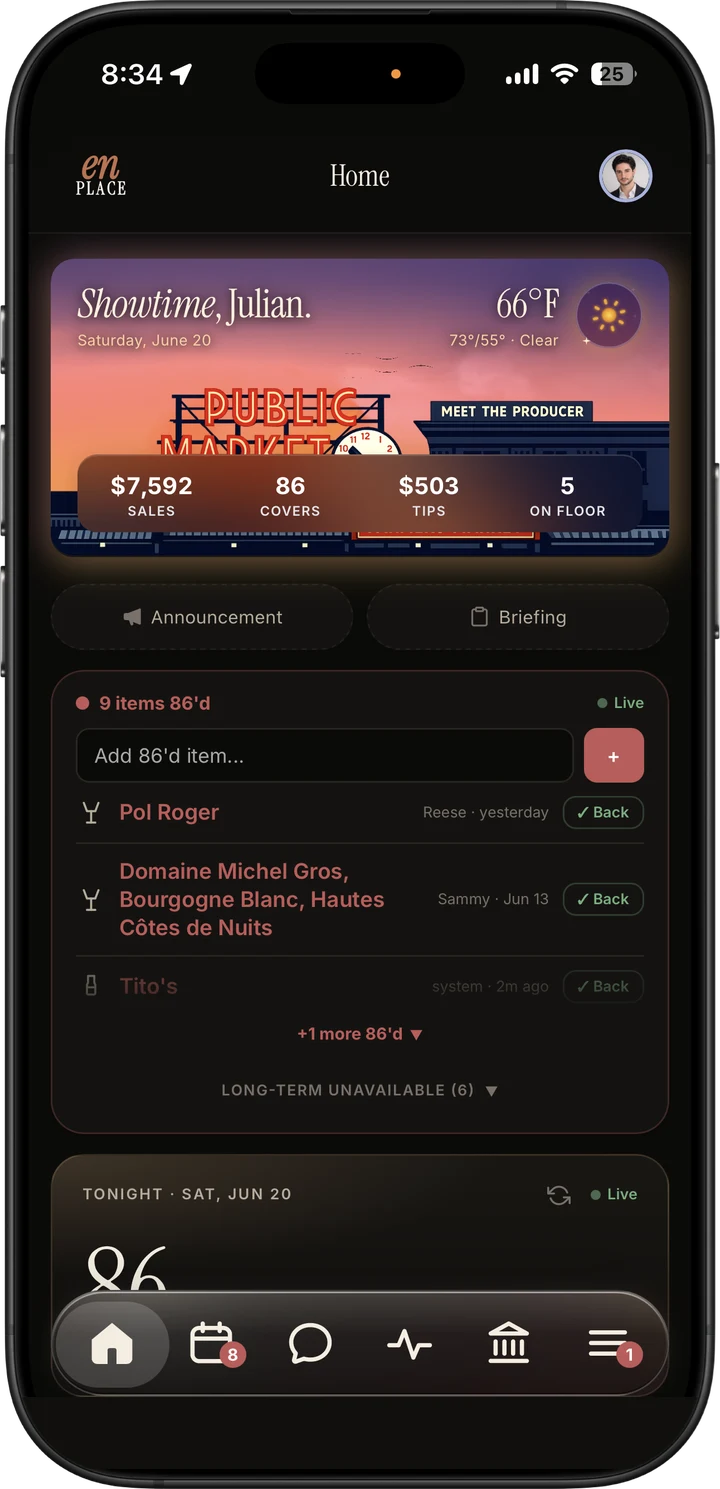

The En Place owner home screen, showing tonight's sales, covers, tips and the live 86 board

Run the floor, the bar, the books. From one place.

Schedules, shift changes, tips, payroll prep, sales from your POS, bar orders, wine, invoices, private events, and an AI assistant that knows your restaurant—all in one place.

Set up with you Works with your POS

Stop duct-taping
the restaurant together.

Most restaurants run on reports or files from their POS, group texts, spreadsheets, inboxes, and memory. En Place brings that work into one place built around your restaurant.
Scheduling
7shifts / HotSchedules
Knows your rotation. Handles swaps, pickups, and time-off without you in the middle.
Communication
Slack / GroupMe
Swap requests don't get buried under memes. Messages are tied to shifts and roles.
Tips & Payroll
Tip spreadsheets / payroll retyping
Tipout math is done when the shift ends, and you get one payroll-ready file instead of retyping everything.
Operations
Paper binders
Policies, sidework, and required records that are easy to find, update, and share with your team.
Wine & Bar
BevSpot / wine inventory
See orders, invoices, vintages, matching POS items, current market prices, and warnings when margins shrink in one place.
Invoices & Food Cost
MarginEdge
Snap an invoice and En Place reads it: line items are matched, while price jumps and possible short shipments are flagged for your review.
Private Events
Tripleseat / email threads
Inquiries are organized, priced, contracted, and followed up in one place instead of getting buried in the inbox.
Restaurant Assistant
Generic AI chatbots
Your assistant knows the schedule, menu, wine list, invoices, POS, events, policies, and what is happening in service today.

One place for the work
that usually scatters.

Dark mode admin home dashboard with sales, covers, tips, on-floor count, reservations, and 86'd items
Home
Dark mode labor overview with labor cost, on-clock staff, hours, labor percentage, and punch-time editing
Labor
Dark mode team pay tips dashboard with logging compliance, tipouts moved, and staff totals
Team Pay
Dark mode bar operations dashboard with weekly order status, purchase requests, distributors, wine tracker, inventory, invoices, and bar costs
Bar Ops
Dark mode financials dashboard with sales bars, team pay, labor, cash, and bank P and L cards
Financials
Dark mode website traffic analytics with visitors, sessions, pageviews, devices, and new versus returning metrics
Traffic

Start with what hurts most.
Add more when it helps.

1
We see how the work gets done now
We sit with you and find the work still living in texts, spreadsheets, paper, reports or files from your POS, inboxes, and one person's memory.
2
We choose what to fix first
Start with staff and scheduling, add one area you want to improve, or bring the whole restaurant together.
3
We help your team get started
We bring over your information, train your managers and team, check everything with you, and stay close while everyone gets comfortable.

Start on the floor, work the pass,
or run the whole house.

Floor
Keep every shift, request, message, and policy in one place
  • A weekly schedule built around your rotation, roles, and manager approvals
  • Shift swaps, pickups, time-off requests, and current availability
  • Open shifts and coverage reminders
  • Team messages, direct messages, mentions, polls, and announcements
  • Policies, sidework, contacts, roles, and staff directory
  • One place for managers to see what matters today
  • Simple new-hire setup with clear steps for managers
  • Secure phone sign-in and alerts, with key tools that still work when internet or cell service is spotty
No POS connection required. Floor gives your team one dependable place for schedules, messages, policies, sidework, and the day's work.

Start with staff and scheduling.
Add what your restaurant needs.

Prices are per location. Each plan includes a set number of active team members—anyone scheduled, clocked in, tipped, messaged, or logged in during the last 60 days.
Loading current pricing…
Waitlist only
Starter
Scheduling and team basics for restaurants with 20 people or fewer.
Loading…
Current price
  • Team members included
  • Build schedules, collect availability, and handle requests
  • Keep team messages, policies, sidework, and roles in one place
  • Set it up yourself, with help by message when you need it
  • More than 20 team members? Choose Floor
  • The AI assistant, document scanning, voice tools, and connections to other software are not included
Join the Waitlist
Floor
One dependable place to schedule your team and run each shift.
Loading…
Current price
  • Team members included
  • Build schedules, handle requests, and see who is available
  • Keep team messages, policies, sidework, and roles in one place
  • The one-time Guided Launch brings over one set of your information and trains your managers
  • No POS connection required
Book a Demo
Full House
Bring your team, money, purchasing, guests, and events together.
Loading…
Current price
  • Team members included
  • All Floor staff and scheduling tools, plus labor and money, purchasing and margins, and guests and events
  • Before setup, we agree on what En Place will do for your restaurant
  • We set up and check each part with you before your team depends on it
  • Includes the AI assistant, document scanning, voice tools, and the connections to your other tools that we agree on
Book a Demo
What each area covers
Every plan starts with staff and scheduling. Pass adds one area you choose; Full House includes all three.
Staff & SchedulingSchedules, requests, availability, messages, policies, sidework, roles, new-hire setup, and one clear manager view.
Control & MoneySales, labor, timecards, tips, payroll prep, and reports that help you spot labor and money problems early.
Purchasing & MarginOrders, invoices, inventory, vendors, menu costs, beverage programs, and price changes.
Guests & EventsReviews, reservations, guest notes, inquiries, private events, follow-up, and what brings people in.
One-time setup
Guided Launch — Loading…. Floor or Pass. We set up En Place, bring over one set of the information you already use, train your managers, and check everything with you before your team starts.
White-Glove Launch — Loading…. Pass or Full House. We bring over more information, connect the tools in your plan, fit En Place to how your restaurant works, train your managers, and fine-tune it after your team starts.
Full Platform Launch — Loading…. Full House only. We bring together information from several tools, train your team, check each included area with you, and agree on the order for starting each part.
How the 60-day team count works
Floor, Pass, and Full House can add more team members
Your count is based on who worked or used the staff system during the previous 60 days. We review it with you every three months before making any change to your plan.
Add another Pass area later: Once your first area is working, you can add a second for a price we review with you. We quote anything outside those two areas before we start.
Plan prices and included team members are per location. Annual billing may be available at 10% off after your initial paid trial. Have more than one location? We price them together based on the setup and support they can share.

Connects to what you already run.

We don't replace your POS or reservations. We bring the useful information together so you do not have to jump between tools.
Genius POS
OpenTable
QuickBooks
OneDrive + Office
Gmail
Google Reviews
Google Analytics
Payroll files
ADP
AI assistant powered by OpenAI
Coming soon More restaurant POS systems

Genius is connected today. Use a different POS? Tell us which one you use.

Toast
Square for Restaurants
Clover
Lightspeed Restaurant
TouchBistro
SpotOn
Heartland Restaurant
SkyTab

Built by someone who
still closes at midnight.

I own Place Pigalle at Pike Place Market. I built En Place because every tool I tried was designed by people who've never worked a Friday night. This is not software I hand you and leave you to figure out. I sit with you, learn your restaurant, and set up En Place with you.
Mise en place: everything in its place before the first ticket fires. We took the second half of that phrase. The software does the same thing for your entire operation.

Julian taking orders on the Place Pigalle patio overlooking Puget Sound

Common questions.

Let's talk about
your restaurant.

Tell me which recurring job is still stuck in texts, spreadsheets, paper, reports or files from your POS, or someone's memory. I'll show you the smallest En Place plan that can solve it.
Every demo request is read personally. The AI assistant uses your restaurant's information to answer your questions. We do not use that information to train AI for other customers or the public, and we never send payment information to AI.